News in GoalEnvision 2 January 2026

HAPPY NEW YEAR from all of us at GoalEnvision. We are kicking off the year with a brand new look and other improvements.
News
New view: Monthly report
Option to change concept names
New view: Monthly report
You can access the new Monthly Report view from the tab on the overview page called Monthly Report. This view is designed to serve as an agenda or meeting schedule for management or board meetings, for example. You can see all strategic goals, their conditions, discussions and decisions in a vertical list, sorted by strategic perspective.
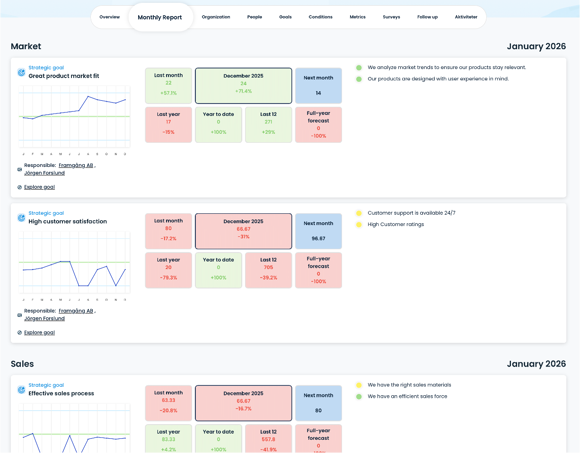
The dashboard in the middle of each strategic goal shows, among other things:
Results for the last month, compared to the target
The outcome for the selected month (e.g. December), compared to the target
The target level for the coming month
Comparison with the same month last year
Accumulated results for the current year
Results for the last 12 months
Full-year forecast, based on rolling 12 months
The purpose of the dashboard is to quickly see:
where you are ahead or behind plan, whether the trend is stable, improved or deteriorated and which goals need to be discussed in more detail at the meeting
The dashboard is therefore intended as a decision support tool and serves as a natural starting point for dialogue and prioritisation.
To the left of each strategic goal, you will see its conditions and respective traffic lights. By clicking on a condition, you will get an overview of ongoing discussions, decisions made and activities related to that particular condition.
If you hover your mouse over the different parts, a more detailed description of what each element represents will be displayed.
Option to change concept names in the framework
GoalEnvision is based on a proven model that covers the entire strategy. But perhaps you want to change the name of one of the concepts? In Settings, you can go to the Concept Names tab and change the names of Vision, Mission statement, Growth Targets and the strategic perspectives Market, Sales, Operations, People and Finance.
This is particularly useful if, for example:
are an association and would rather talk about purposes and operational goals
are a public organisation and want to use terms such as mission, impact goals or areas of activity
already have an established internal language that you want to keep
By adapting the terms to your reality, GoalEnvision becomes easier to use, easier to understand and more firmly rooted in everyday life.
Share this article
Did you like this article? Here is more...
Edit goals and conditions directly Change survey linked to a condition Clearer traffic lights on the perspective page Minor improvements